
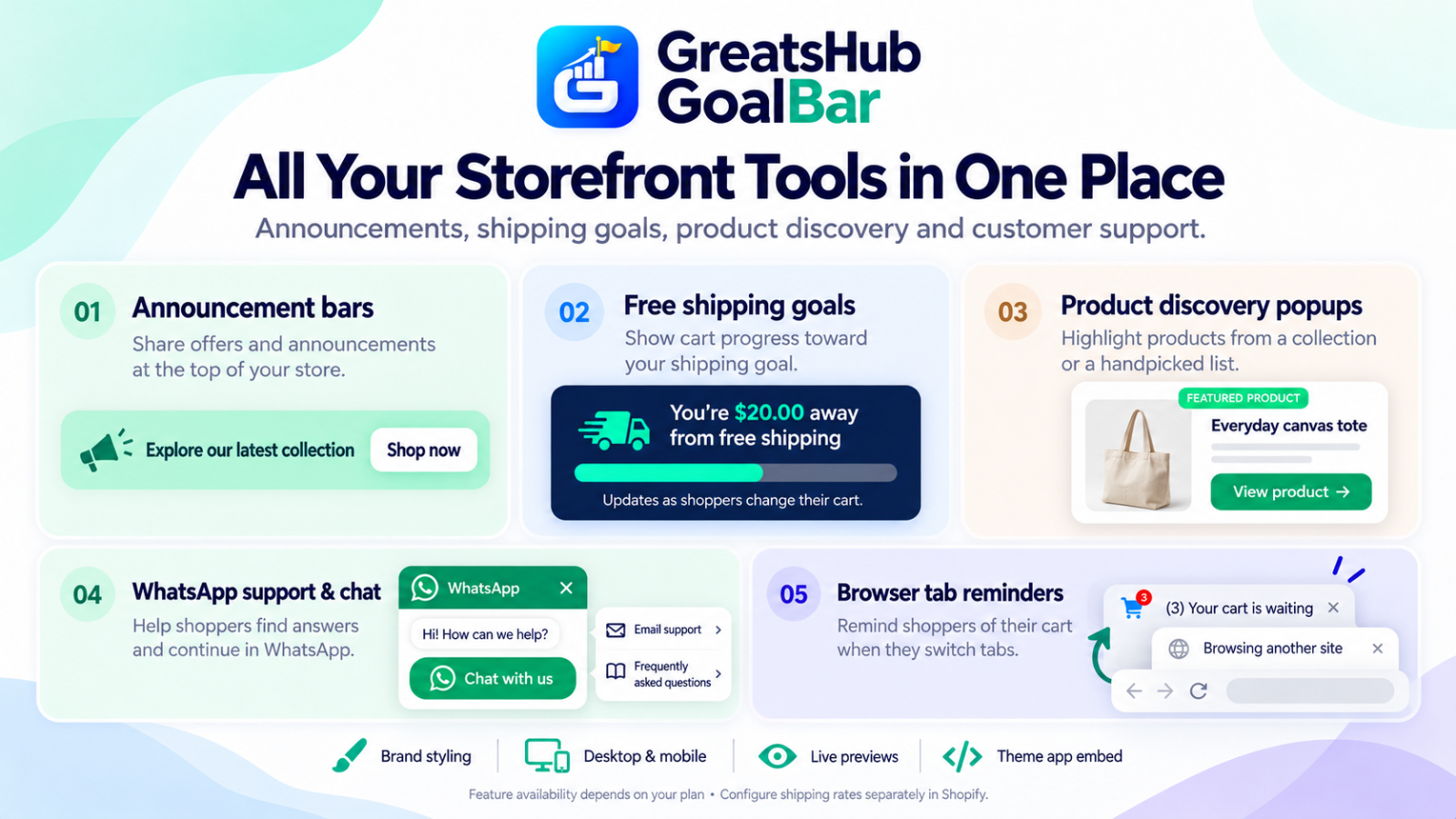
All Your Storefront Tools in One Place with GoalBar
A helpful storefront answers questions at the right moment. What is the current offer? How close is the cart to free shipping? Where can shoppers find another product or ask for help?
GoalBar brings several Shopify storefront tools into one app: announcement bars, free shipping goals, product discovery popups, WhatsApp support and browser tab reminders. Merchants can choose the tools they need and customize their appearance to match their store.
Share clear offers with announcement bars
An announcement bar gives your message a visible place at the top of the storefront. Use it to introduce a collection, explain a shipping offer or highlight an actual promotion.
GoalBar lets you customize messages, colors, background styles and calls to action. A clear button such as “Shop now” helps shoppers understand where to go next.
Keep the message focused. “Explore our latest collection” is easier to follow than several unrelated offers displayed together. Choose a background that supports readable text and check the result on mobile before publishing.
Show progress toward free shipping
Shoppers benefit from knowing how much more they need to add to qualify for a shipping offer.
GoalBar’s shipping messages respond to the cart state:
- Empty cart: introduce the shipping goal.
- Below the goal: show the remaining amount or quantity.
- Goal reached: display the success message.
For example, a store with a $50 goal could show “You’re $20 away from free shipping” when the eligible cart amount is $30.
Shipping cards can appear on product and cart pages, helping shoppers see progress close to their purchase controls.
Configure matching shipping rates in Shopify. GoalBar displays progress; Shopify determines the shipping charges at checkout. Check your conditions for the markets, currencies and destinations where you offer free shipping.
Help shoppers discover products
Product discovery popups provide another way to introduce your catalog.
Choose a collection for an easy-to-maintain selection, or handpick up to five products. Shopify supplies the product information, including images, titles and links.
Merchants can adjust the popup’s layout, colors, message, button and display timing. Collection selection considers up to 20 products per page, with unavailable products skipped.
Display controls can also help keep recommendations relevant. Depending on your settings, you can skip the current product, exclude products already in the cart or hide notifications on cart pages.
These are featured product cards, rather than recent-purchase notifications. Use honest product messages and actual promotions instead of invented purchase times or customer activity.
Make support easier with WhatsApp
A shopper may need an answer before deciding what to buy. GoalBar’s WhatsApp support tools give them a convenient way to contact your store.
You can customize the button’s icon, text, colors, size and position. Additional options include a welcome chat window, prefilled messages and chat backgrounds.
Quick Help links can direct shoppers to email support, frequently asked questions, or shipping and returns information.
Business-hours settings let merchants display their configured availability using a store timezone and working-day schedule. This describes your support hours; it does not confirm that an agent is currently online.
Conversations continue in WhatsApp, where shoppers review and send their messages.
Remind shoppers about their cart
Shoppers often switch between browser tabs while comparing products.
GoalBar’s browser tab reminders can change the store tab’s title to a message such as “Your cart is waiting.” Cart-count badge controls provide another visual reminder.
The original title returns when shoppers come back to the store tab. This feature works within an open browser tab and does not send browser push notifications.
Review storefront activity
Optional analytics help merchants understand recorded activity across their tools.
GoalBar’s storefront insights include bar views, shipping goals reached, WhatsApp clicks and goal rate, with daily graphs and 7-day or 30-day views.
These metrics need careful interpretation:
- A goal reached does not confirm a completed purchase.
- A WhatsApp click does not confirm that a message was sent.
- Cart value at goal completion is not paid revenue or sales uplift.
Activity recording depends on analytics consent, and counts can be incomplete because of blocked requests or network failures.
Use these insights to understand tool engagement alongside your store’s order reporting.
Customize, preview and publish
Start with one clear shopper need, then add more tools as they become useful.
Customize your messages and design, review desktop and mobile previews, and save and publish your settings. Then enable GoalBar’s app embed in the correct Shopify theme and save the theme.
Publishing settings and activating the theme embed are separate steps. After setup, test your home, product and cart pages, including an empty cart, a cart below the shipping goal and a cart that qualifies.
Feature availability depends on your plan. Review the current plan permissions before choosing advanced designs, scheduling or targeting controls.
Bring your storefront tools together
GoalBar helps merchants present offers, explain shipping progress, introduce products and make support easier to find.
Choose clear messages, keep designs consistent and test the shopping experience on mobile. Each tool should give shoppers useful information at the moment they need it.
Explore GoalBar’s features and choose the tools that fit your store.